Everything extracted from your sources, in one place.
Needs attention
Upcoming
Timeline
All extracted events, chronologically.
Calendar
Click a day to see what's due.
Conflicts
Events that overlap in time.
Changes
What's different from what was previously extracted.
Sources
Paste a notice below (WhatsApp/email text). NewNotes extracts events, diffs them against what it already knows, and checks for conflicts.
Submitted sources
No sources submitted yet.
How it works
The pipeline behind NewNotes, end to end.
1. You paste a notice
On the Sources tab you paste in raw text — a WhatsApp forward, an email, a notice board photo you typed up. Nothing is parsed on your end; the whole block of text is sent as-is to the backend.
2. An LLM extracts structured events
The backend sends that text to Gemini with a strict extraction prompt: pull out every exam, deadline, or event, and return title, date, start/end time, venue, and a type (exam / internship / assignment / event / other). The model is told to reply with JSON only — the backend still defensively re-parses the response in case it wraps the JSON in prose.
3. Each event is diffed against what's already stored
Events are matched by a normalized title. A brand-new title is inserted and tagged New. A title that already exists gets compared field by field — if the date, time, or venue changed, the old values are kept as "previous" and the event is tagged Changed, which is what powers the before/after arrows you see on the Changes tab. If nothing changed, it's just a silent refresh.
4. Conflicts are computed on every read
Nothing is flagged as a conflict at write time. Every time the app loads state, it compares every pair of events on the same date and checks whether their time ranges overlap. Overlapping pairs get cross-linked, which is why dismissing a conflict has to clear it on both sides of the pair — otherwise one side is left silently stranded.
5. A daily digest — and on-demand — goes out by email
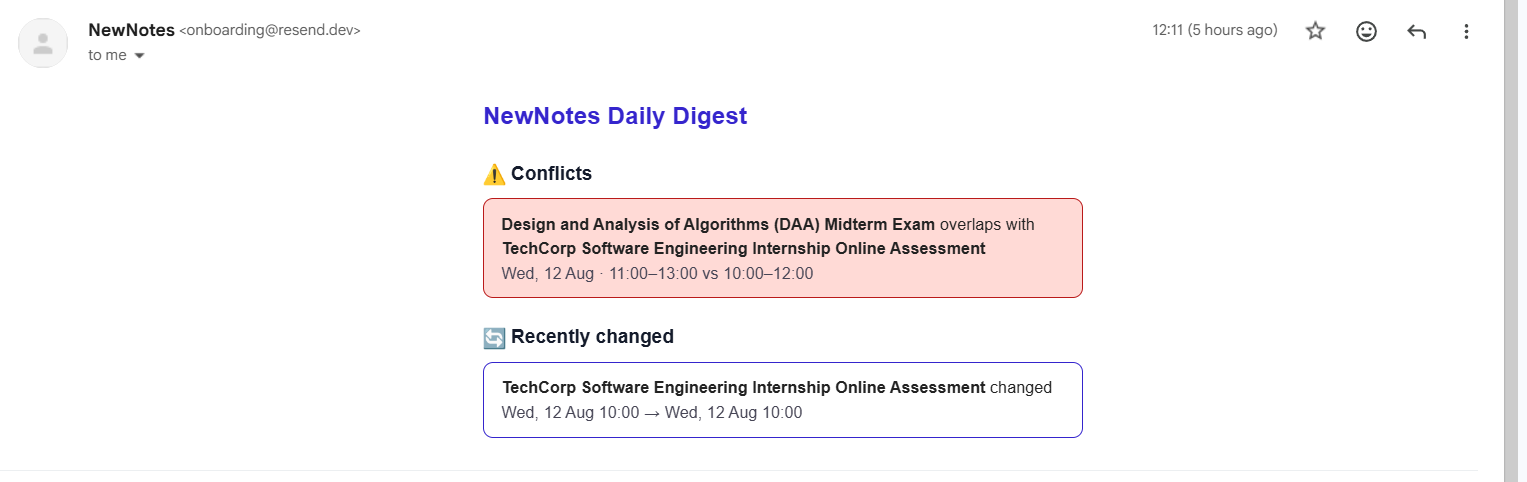
If RESEND_API_KEY and REMINDER_EMAIL are set, the backend can email a digest of conflicts, events coming up in the next 48 hours, and recent changes. It runs automatically at 8am daily via a cron job, and you can also fire it immediately with the Send reminder email now button on the Overview tab — same digest, same code path, just triggered manually instead of on a schedule.
A real digest — the conflict block above is exactly the DAA Midterm vs. TechCorp OA overlap the sample notices in Sources create, and the "Recently changed" block is the deadline-extension sample.
6. Calendar & notes are just views over the same data
The Calendar tab renders the same events on a month grid, and lets you jot a free-text note on any day — separate from extracted events, for anything you want to remember about that date.
7. Sharing straight from WhatsApp
NewNotes can appear in your phone's native Share sheet — tap Share on a WhatsApp message, pick NewNotes, and it opens straight into Sources with the message text already pasted in, ready to Extract. This needs the site "installed" first: open it in Chrome on Android, use "Add to Home Screen," and it'll show up as a share target from then on. It's an Android/Chrome feature — Safari on iPhone doesn't support this yet, so on iPhone you'd still copy-paste.